TL;DR
A technique to launch a process through explorer.exe instead of your own
process. From an EDR standpoint the resulting process hierarchy looks like a user clicked or launched something normally: explorer is the parent, your binary disappears from
the process hierarchy. This breaks the process chain that detection rules rely on, and it can
be used to roughly emulate user-driven execution from an unattended payload.
The technique is not new. It is commonly used by software like Firefox to launch processes, but I’d like to share with you the research I’ve done on the subject. It has allowed me to explore quite a few different aspects and gain some understanding of COM objects and how to interact with them.
Exploader tool repo: https://github.com/MrSacre/Exploader
Glossary
COM (Component Object Model): Microsoft’s binary interface standard for inter-process and cross-language object communication. Lets a client call methods on an object without knowing where that object lives or in what language it was written.
COM object: An instance of a COM class, accessed by the client through one or more interfaces (contracts of methods). A COM object can live in the caller’s process (in-proc) or in a separate process (out-of-proc)
CLSID: A CLSID is a globally unique identifier that identifies a COM class object.
An in-proc server is a DLL registered under the CLSID’s InprocServer32 registry key. When a client calls CoCreateInstance, the COM runtime loads the DLL into the client’s address space, and the object lives directly inside the calling process. Method calls are plain function calls, with no marshalling involved. This is the most common case.
An out-of-proc server is a standalone executable registered under the CLSID’s LocalServer32 key. The object lives in a different process from the client. The client therefore does not receive the object directly, but a “proxy”: a local wrapper that looks like the object, but whose method calls are serialized (marshalling) and sent to the server via LRPC, Windows’ local RPC transport. On the server side, a stub deserializes the call and invokes the real object. The return value travels back the same way in reverse.
Introduction
While digging into custom protocol handlers (a topic that will get its own post if the results are interesting enough), I ran into a behaviour I didn’t expect.
A custom protocol handler is the mechanism the browser uses when you click a
URL with a scheme it doesn’t natively understand, like discord://something. The browser looks the scheme up locally in the registry, finds
the application registered for it, and launches that application with the command line specified in the registry key.
For Chrome, the process chain looks like this:
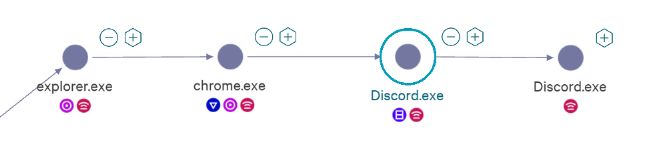
When you type discord://test into Chrome, with Discord installed, Chrome
launches the Discord process with the URL as its argument.
Testing the same thing on other browsers, Firefox gave me this:

No trace of the browser anywhere in the process hierarchy. Discord shows up under
explorer.exe! Interesting?
In this post, we will see the reason behind this behavior, provide a proof of concept for the technique in a short code snippet, and discuss the implications this may have, not only for the red team and OPSEC, but also for the blue team in terms of detection.
The technique: COM, reparenting, proxy hosts
How does it work?
The mechanism we abuse here is something Microsoft put in place deliberately, first publicly documented by Raymond Chen on The Old New Thing (How can I launch an unelevated process from my elevated process and vice versa?). Its original purpose is to address a need for privilege de-elevation: an elevated process can ask explorer (which runs at the user’s integrity level) to launch a child on its behalf, so the new process doesn’t inherit elevated rights. The actual code in Firefox that does it can be found here. My PoC is adapted from that file. The same path can also be abused to break a process’s execution chain or to make malicious activity look like legitimate user behavior.
The technique relies on the fact that explorer.exe, at startup, registers itself as a server for the ShellWindows CLSID ({9BA05972-F6A8-11CF-A442-00A0C90A8F39}) using CoRegisterClassObject. To verify this, I injected a small Frida script into explorer at startup that hooks this function and prints the CLSID along with the flags passed to it:
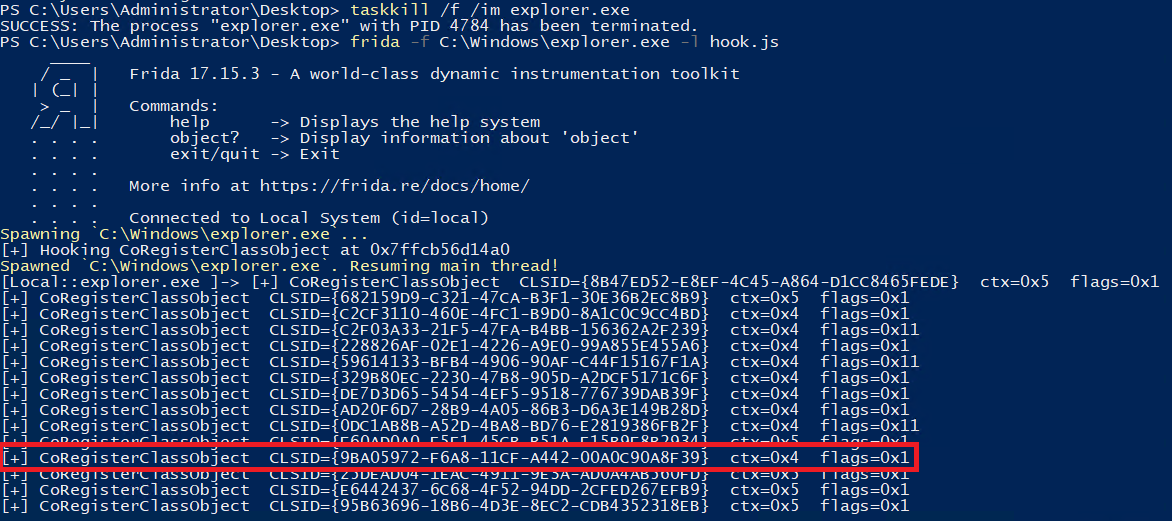
We can see that explorer.exe registers itself for the ShellWindows CLSID with context 0x4, which corresponds to CLSCTX_LOCAL_SERVER (see the CLSCTX documentation), that is, out-of-proc (see glossary). This registration lets the COM Service Control Manager (SCM) know that a server already exists for this CLSID and that there is no need to launch a new one.
At this stage, Explorer has registered itself as a server for ShellWindows with the COM SCM, which now has a corresponding entry:
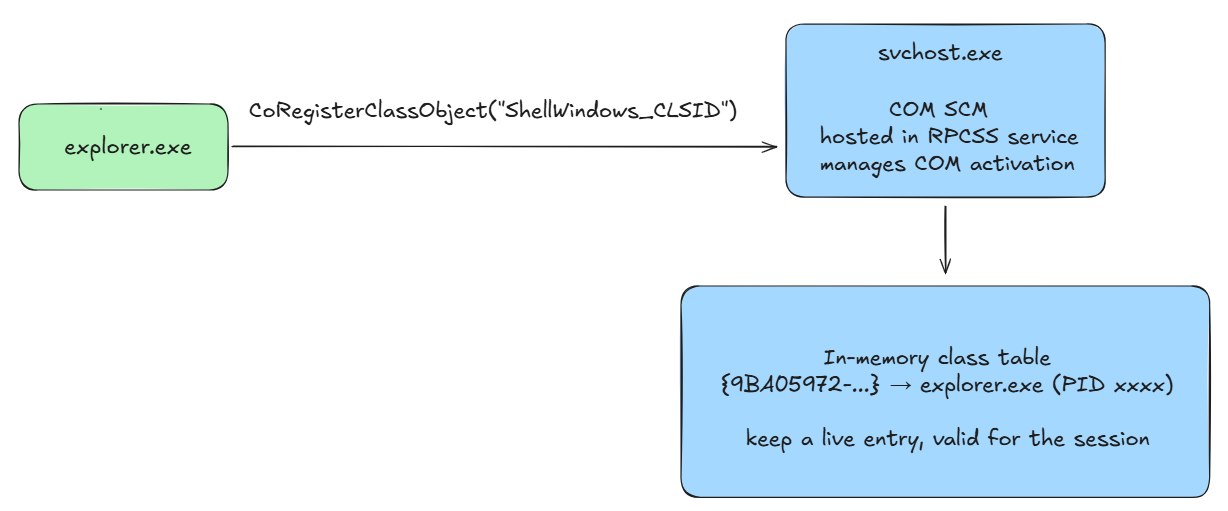
From there, when a program calls CoCreateInstance with the ShellWindows CLSID, the SCM returns a pointer to an IShellWindows interface served by explorer. All method calls on this object are marshalled via LRPC and executed inside explorer.
NB: if a client calls CoCreateInstance on a CLSID and no server has registered for it, the SCM falls back to the HKEY_CLASSES_ROOT\CLSID\{CLSID}\LocalServer32 registry key and executes the command stored there. This command is expected to launch a process which, in its own code, registers itself as a server via CoRegisterClassObject (the -Embedding flag passed on the command line signals this activation mode). Only once that server has registered itself can the SCM return the object to the client.
Now that the setup behind the technique is clear, let’s see how it is exploited in practice, from the ShellWindows proxy down to the execution of an arbitrary binary.
We know that explorer registers itself as a server for CLSID_ShellWindows, which lets any client in the session obtain a proxy to a ShellWindows object served by explorer. That object is a collection of open shell windows; it does not, on its own, expose any method to execute code. The interface it implements (IShellWindows) is meant for enumerating shell windows. The trick is to navigate from there to the IShellDispatch2 object that explorer holds internally (IShellDispatch2 is not exposed as a directly instantiable CLSID, which is why it has to be reached by navigating from a shell object):
ShellWindows                  ← proxy returned by CoCreateInstance
  → Item(VT_EMPTY)            → desktop window dispatch
    → Document                → IShellFolderViewDual
      → Application           → IShellDispatch2
        → ShellExecute(...)   → CreateProcess inside explorer

Each arrow above is a method call routed via LRPC to explorer.exe;
each returned object is itself a proxy. ShellExecute therefore runs
inside the explorer process, and explorer is the one calling CreateProcess.
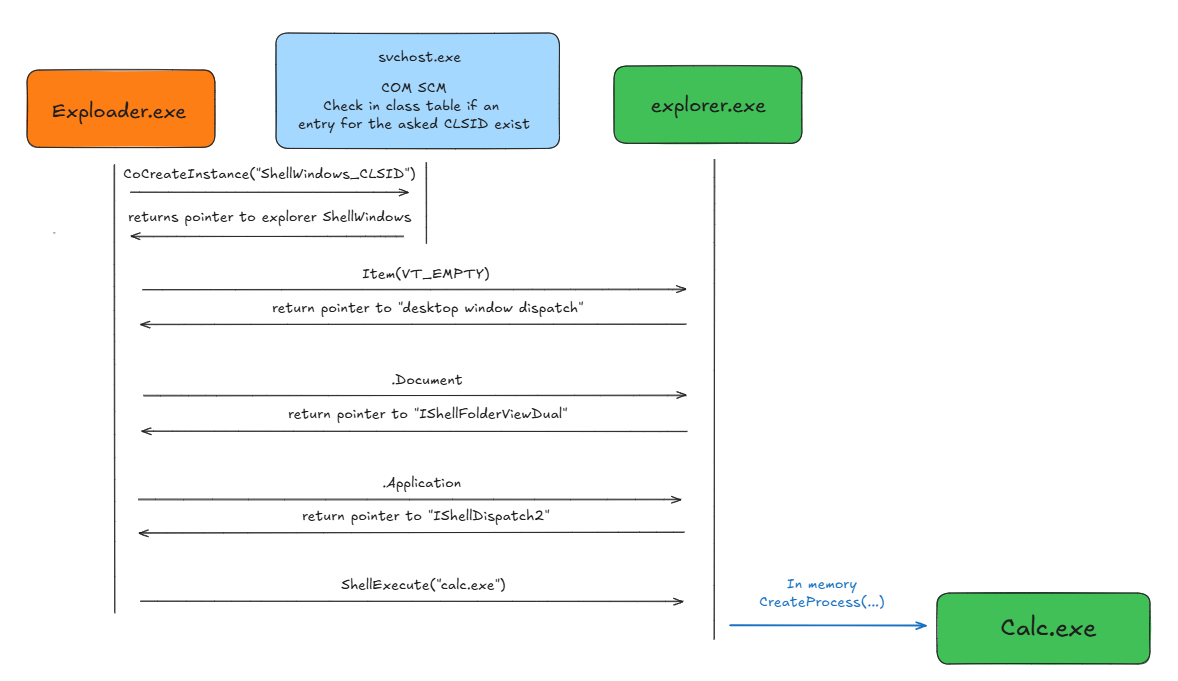
When ShellExecute runs, it runs inside the process that serves the object. With explorer alive and serving the CLSID, that process is explorer.exe, and explorer is the one calling CreateProcess for the target. The new process gets explorer as its parent in the Win32 lineage.
This is not parent PID spoofing. Nothing is faked. Explorer genuinely is the creator, because explorer really did the CreateProcess. This is precisely what makes it different from the PROC_THREAD_ATTRIBUTE_PARENT_PROCESS technique (where the implant itself calls CreateProcess and lies about the parent, leaving the real creator recoverable in the calling thread’s context).
The link back to the original caller lives only in the LRPC exchange between client and server, which standard process telemetry does not capture. The COM ETW provider (Microsoft-Windows-COM-Perf) does log the client-side COM_CreateInstance events with the CLSID. That is what makes the technique both effective and hard to attribute back to the original caller without out-of-band telemetry.
This works because explorer pre-registers itself as a server for ShellWindows. As we’ll see next, it does NOT do this for ShellBrowserWindow (another COM object that exposes the same IShellDispatch2 interface and could in theory be abused the same way), which has very different OPSEC consequences.
Proof of Concept
Benchmark against EDR
I tested this technique against two of the leading EDR products on the market. Big thanks to the people who gave me access to labs running them. I only had limited time on each, and could not push the investigation as far as I would have liked.
Both agents ran in their most restrictive default policy (prevention mode, not detection-only). I did not add custom rules or tune policies on top of the vendor defaults. I’ve also tested other techniques that aim for the same goal: making another process run commands on your behalf.
Results
| Technique | EDR 1 | EDR 2 |
|---|---|---|
| ShellWindows + navigation | Allowed, parent chain broken | Allowed, but caller → target link reconstructed in telemetry |
| ShellBrowserWindow direct | Blocked (matched a vendor IOA rule) | Blocked (E_FAIL at the COM creation) |
| MMC20.Application | Blocked (matched a vendor IOA rule) | Allowed, but caller → target link reconstructed |
Why three semantically equivalent paths produce different telemetry
ShellWindows uses a server pre-registered by explorer at startup. The activation reuses the running explorer process: no host startup, no
rundll32spawn, no new process at all. The only Windows events triggered are an LRPC call and, eventually,CreateProcessfrom explorer for the target.ShellBrowserWindow has no pre-registered server. The COM SCM falls back to the
LocalServer32registry key, which spawns a new host viarundll32.exe shell32.dll,SHCreateLocalServerRunDll {...} -Embedding. Since this behavior is unusual, it is easy for an EDR to monitor it and trigger an alert.MMC20.Application spawns an
mmc.exehost, which in turn executes the target viaDocument.ActiveView.ExecuteShellCommand. The resultingmmc.exe → calc.exeparent-child pair is itself anomalous:mmc.exespawning a non-snap-in process is rare in benign activity.
Red team implications
From a red team perspective, this technique is interesting on several axes:
Some EDRs may miss information about inter-process communication via LRPC, or at the very least, the logs sent by the agent do not by default contain the information necessary to pivot between the different processes (in this case, the execution of notepad.exe by Exploader through explorer.exe).
When the EDR is not able to correlate the full process execution chain, the process hierarchy matches what you would see if a real user double-clicked something on the desktop. We can imagine a beacon that weaponizes this technique to execute commands from explorer while hiding its presence, without leaving forensic traces for investigators.
The fact that explorer.exe runs the target in its own context is interesting. We can imagine the inverse pattern, weaponizing this technique by making a high-integrity process register a COM server that executes our code, but from an EDR standpoint, depending on the process, the resulting parent-child pair can look strange (as we saw with MMC on EDR 1).
Which CLSID you call matters a lot from a detection standpoint, even though they all end up doing the same thing internally. As shown in the benchmark, some CLSIDs are not used often and trigger the EDR when activated, as we saw with ShellBrowserWindow.
Blue team implications
I’ve made the source code and compiled versions of the different programs available on the GitHub repo, along with PowerShell versions. You can replay these scenarios against your EDR, look at the telemetry it generates, and see whether it natively links the process making the RPC calls to explorer.
Something to keep in mind during incident response: what your EDR or logs show you is not necessarily the full reality, and missing information can lead you down the wrong path. In the case of EDR 1, there is no possible pivot between the process launched by explorer and Exploader. The broken process chain suggests that the user intentionally, or unintentionally, executed the commands and processes themselves.
Finally, since everything happens in memory and over RPC, few traces are left behind by this technique, which makes forensic reconstruction after the fact difficult.
How to catch it?
If the pivot via this channel isn’t natively done by your EDR, it’s worth knowing that the telemetry exists on the ETW side, specifically the Microsoft-Windows-COM-Perf provider, which contains logs of RPC communications and lets you make the link. I’ll walk through the methodology I used here; it’s scalable and can extend to other COM techniques.
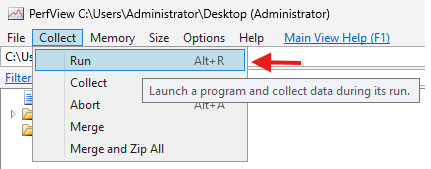
I used PerfView, a free tool from Microsoft that creates ETL (Event Trace Log) files based on ETW (Event Tracing for Windows). By monitoring the providers’ telemetry while my process was running, I got some interesting logs. You can launch Exploader like this:
Warning: the COM provider we care about,
Microsoft-Windows-COM-Perf, is not enabled in PerfView’s default preset. You have to add it explicitly:
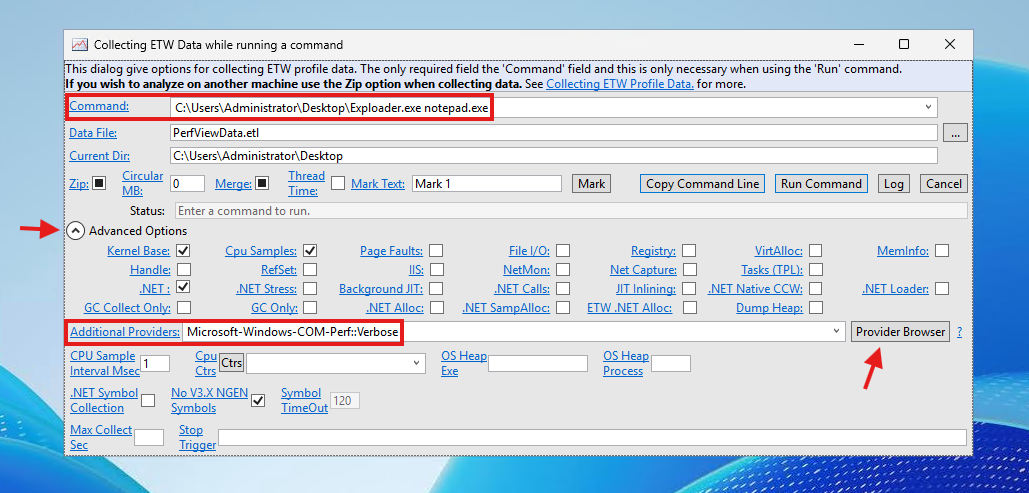
We can then see the logs from Microsoft-Windows-COM-Perf/COM_ClientSyncCall/Start. We find the calls made from our program to the different interfaces, including the one we’re interested in: a4c6892c-3ba9-11d2-9dea-00c04fb16162, which is IShellDispatch2 (see the doc).
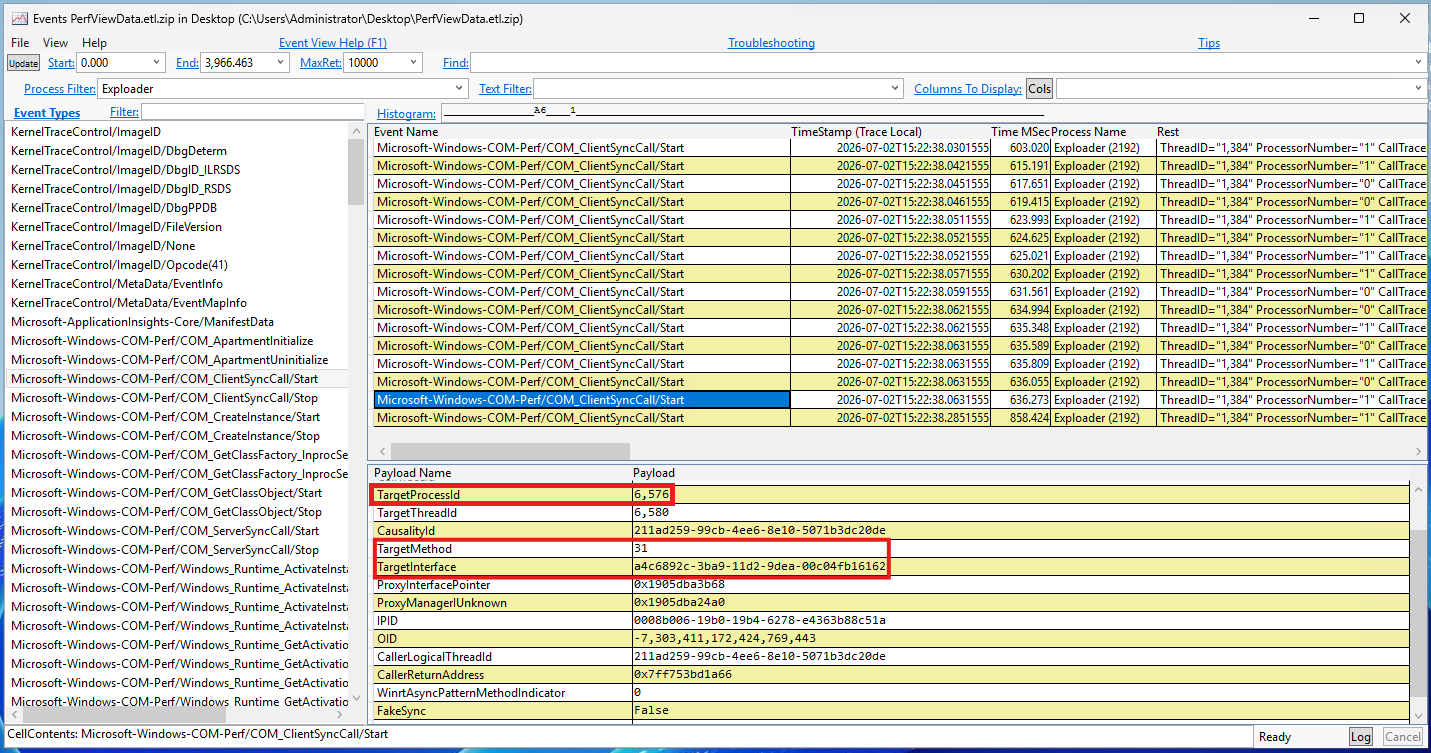
At this stage that’s not enough, it only tells us that a process named Exploader (PID 2192) made a call on the IShellDispatch2 interface at method slot 31, in the process 6576. To identify which method that actually is, I went looking for the interface declaration in the SDK. It lives in ShlDisp.h (see the docs). I installed the latest Windows SDK available at the time of writing, Windows SDK for Windows 11 (10.0.28000.2270), and with the default install path, the header is found at:
C:\Program Files (x86)\Windows Kits\10\Include\10.0.28000.0\um\ShlDisp.h
NB: COM interfaces are never modified once published, in order to preserve backward compatibility. When new methods are needed, Microsoft creates a new interface (
IShellDispatch3,IShellDispatch4, etc.), which means the UUIDs of existing interfaces remain constant. So this slot number is stable across Windows versions.
We find the interface declaration in the header:

along with its methods:
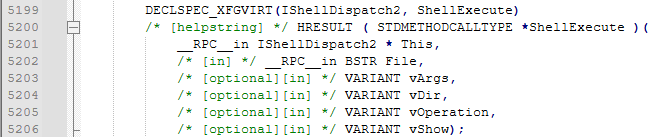
The full list of methods declared for this interface, counted from the vtable in ShlDisp.h, gives us the following table. This confirms that method 31 of IShellDispatch2 is indeed ShellExecute:
| Slot | Origin | Method |
|---|---|---|
| 0 | IUnknown | QueryInterface |
| 1 | IUnknown | AddRef |
| 2 | IUnknown | Release |
| 3 | IDispatch | GetTypeInfoCount |
| 4 | IDispatch | GetTypeInfo |
| 5 | IDispatch | GetIDsOfNames |
| 6 | IDispatch | Invoke |
| 7 | IShellDispatch | get_Application |
| 8 | IShellDispatch | get_Parent |
| 9 | IShellDispatch | NameSpace |
| 10 | IShellDispatch | BrowseForFolder |
| 11 | IShellDispatch | Windows |
| 12 | IShellDispatch | Open |
| 13 | IShellDispatch | Explore |
| 14 | IShellDispatch | MinimizeAll |
| 15 | IShellDispatch | UndoMinimizeALL |
| 16 | IShellDispatch | FileRun |
| 17 | IShellDispatch | CascadeWindows |
| 18 | IShellDispatch | TileVertically |
| 19 | IShellDispatch | TileHorizontally |
| 20 | IShellDispatch | ShutdownWindows |
| 21 | IShellDispatch | Suspend |
| 22 | IShellDispatch | EjectPC |
| 23 | IShellDispatch | SetTime |
| 24 | IShellDispatch | TrayProperties |
| 25 | IShellDispatch | Help |
| 26 | IShellDispatch | FindFiles |
| 27 | IShellDispatch | FindComputer |
| 28 | IShellDispatch | RefreshMenu |
| 29 | IShellDispatch | ControlPanelItem |
| 30 | IShellDispatch2 | IsRestricted |
| 31 | IShellDispatch2 | ShellExecute |
| 32 | IShellDispatch2 | FindPrinter |
So we now have a first anchor for a detection rule with the following elements:
a Microsoft-Windows-COM-Perf/COM_ClientSyncCall/Start event with TargetMethod=31 on TargetInterface=a4c6892c-3ba9-11d2-9dea-00c04fb16162 corresponds to a call to ShellExecute on the IShellDispatch2 interface exposed by the process at TargetProcessId.
Now, how do we know what was executed? We can correlate this with another ETW event, Windows Kernel/Process/Start. Since ShellExecute results in an activation of the target file (open by default, or edit/print/runas depending on the operation parameter), we can pair the first event (some process asked explorer.exe to activate a file via ShellExecute) with the processes started by explorer in the same time window, and identify the file that was opened.
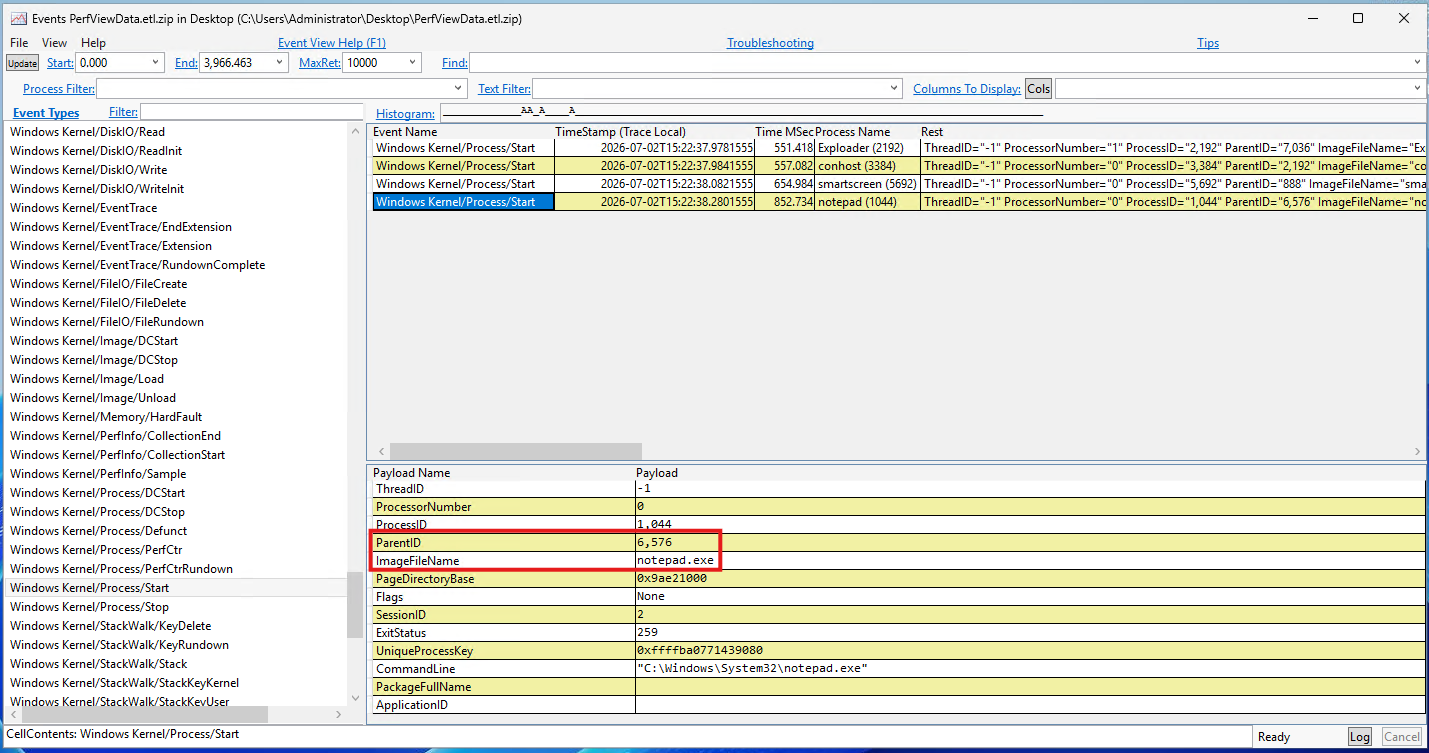
We’ve now successfully correlated Exploader.exe and notepad.exe from ETW alone. This method is a bit heavy, but you can integrate ETW monitoring into your pipeline (we did it with PerfView, but other tooling exists) to listen only to the relevant providers on specific calls, keep the noise down, and forward the correlated events to your SIEM to raise an alert on this class of behavior.
Conclusion
Here’s how it’s possible to abuse a fairly old Windows mechanism, originally meant for privilege de-elevation, as a process proxy execution technique. Researching this topic led me to discover a lot of interesting internals along the way.
On the blue side, I’ve also shared the methodology I used to understand the mechanism in depth and to show how the correlation can be reconstructed if your EDR doesn’t do it natively. (Note that it’s also possible for a program to “patch ETW” and stop these events from being emitted, but that’s out of scope for this post.)
If you have questions, remarks, or just want to discuss about it, feel free to reach me out, I’ll be happy to talk.
References
enigma0x3 on DCOM lateral movement, 2017:
https://enigma0x3.net/2017/01/23/lateral-movement-via-dcom-round-2/
Cybereason on DCOM techniques:
https://www.cybereason.com/blog/dcom-lateral-movement-techniques
Microsoft ExecInExplorer.cpp code snippet:
Elastic Security Labs, Effective Parenting, detecting LRPC-based parent PID spoofing:
https://www.elastic.co/security-labs/effective-parenting-detecting-lrpc-based-parent-pid-spoofing