Introduction
Everyone has already seen a URL (Uniform Resource Locator). The most common ones start with http:// or https://. They belong to the broader family of URIs (Uniform Resource Identifiers), which start with a scheme followed by a colon: scheme:... (source).
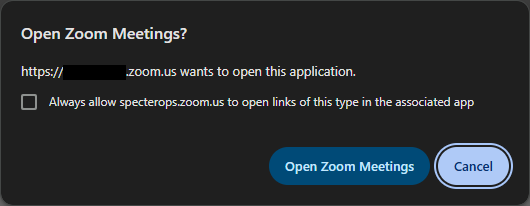
But you’ve probably already clicked on a button or visited a page and your browser asked you to confirm whether or not to open some application, which then took over: sending a mail with the famous mailto:..., joining a Zoom meeting, opening a Discord server. You click, an app opens, and stuff happens. But what actually happens ?
What is a custom URI scheme
The http scheme is the one everyone knows, it lets you fetch a web resource over HTTP. But what if you need to reach a resource, or trigger an action, in another application entirely? That’s where custom URI schemes come in.
Often used for deeplinks and called custom protocols, custom URI schemes apply the same idea to an application: a prefix, a colon, then some content whose meaning the application defines. Examples include links starting with discord://, steam:// or slack://. The scheme itself is the part before the colon; // isn’t mandatory, as mailto:... shows.
The whole point is to make it easy to interact with a local application. A link can identify an action or a resource inside the app without pointing directly at its .exe. The same mechanism lets a web page hand off to a local application, like the “Join meeting” button that opens Zoom.
The generic syntax is defined by RFC 3986, Section 3: scheme ":" hier-part [ "?" query ] [ "#" fragment ]. Here is an example with an authority, a path, a query and a fragment:
         foo://example.com:8042/over/there?name=ferret#nose
         \_/   \______________/\_________/ \_________/ \__/
          |           |            |            |        |
       scheme     authority       path        query   fragment
How do applications and Windows know how to handle it ?
For a custom protocol like myapp://... to be routed to the right application, the association has to live somewhere. To understand what handles the URI, we need to find that association, then identify the code Windows invokes. We’ll focus on two invocation mechanisms: a command line and COM delegation through DelegateExecute.
Command line
For a traditional desktop application, the association lives in the registry, under HKEY_LOCAL_MACHINE\Software\Classes or HKEY_CURRENT_USER\Software\Classes. Both are exposed as a merged view under HKEY_CLASSES_ROOT. A typical structure looks like this (cf this Microsoft doc):
HKEY_CLASSES_ROOT
   alertproto
      (Default) = "URL:Alert Protocol"
      URL Protocol = ""
      DefaultIcon
         (Default) = "alert.exe,1"
      shell
         open
            command
               (Default) = "C:\Program Files\Alert\alert.exe" "%1"
Three things matter here :
- The
alertprotokey gives the scheme name, for example herealertproto:.... - The
URL Protocolstring value, which should be empty, is the marker telling Windows this key declares a protocol handler. - The
shell\open\commandkey holds the command line to run, where%1is a placeholder that gets replaced by the URI passed to the Shell at launch time.
For example, a classic Discord installation can register a command like this:
"C:\Users\<user>\AppData\Local\Discord\app-<version>\Discord.exe" --url -- "%1"
It’s declarative, the application (or its installer) writes these keys and Windows does the rest. For this case, the first target to inspect is the registered command: which executable it starts, which parameters it adds, and where the URI is inserted.
DelegateExecute
Another way keeps the shell\open\command key, but delegates execution to a COM object through the DelegateExecute value, which holds a CLSID (a class identifier). For example with the ms-settings protocol :
HKEY_CLASSES_ROOT
   ms-settings
      (Default)      = "URL:ms-settings"
      URL Protocol   = ""
      shell
         open
            ...
            command
               DelegateExecute = "{4ed3a719-cea8-4bd9-910d-e252f997afc2}"
The Shell activates the COM object identified by this CLSID. To find its implementation, we look up the CLSID’s registration, typically under HKCR\CLSID\{...}\InProcServer32 for a DLL or LocalServer32 for an executable. We won’t cover the COM details here; the important part is that the handler is identified through a class, instead of just a command string.
In the ms-settings test, the CLSID points to windows.system.launcher.dll. Activation goes through the AppModel infrastructure, and the observed parent of the target process is svchost.exe -k DcomLaunch -p.

NB : A command string and a DelegateExecute value can coexist under the same association. Finding a command string alone is therefore not enough to classify the handler as command-line-only.
For Settings, this CLSID is registered as Association Launch Execute Command, with SupportedProtocols = *. Settings delegates to a system component that uses the association’s metadata to activate the target application. Finding the launcher DLL doesn’t finish the job: we still need to identify the application it activates.
If you’re wondering how we can recover the real application when the CLSID is a generic one, I didn’t show you the entire registry key tree, which actually looks like this:
ms-settings
   (Default) = "URL:ms-settings"
   URL Protocol = ""
   Application
      <snip>
      AppUserModelId = "windows.immersivecontrolpanel_cw5n1h2txyewy!microsoft.windows.immersivecontrolpanel"
   Shell
      Open
         ActivatableClassId = "microsoft.windows.immersivecontrolpanel"
         ContractId = "Windows.Protocol"
         DesiredInitialViewState = 0 (REG_DWORD)
         PackageId = "windows.immersivecontrolpanel_10.0.8.1000_neutral_neutral_cw5n1h2txyewy"
         Command
            DelegateExecute = "{4ed3a719-cea8-4bd9-910d-e252f997afc2}"
The AUMID (Application User Model ID) is the key. For a packaged app, the two identifiers that we need are in the AppUserModelId value, separated by ! :
windows.immersivecontrolpanel_cw5n1h2txyewy ! microsoft.windows.immersivecontrolpanel
└──────────── PackageFamilyName ───────────┘   └───────────── AppId ────────────────┘
             the package family                  the <Application> in the manifest
The family name isn’t an installation path. We first find the package registered for the current user, then its InstallLocation and the application’s declared executable. For Settings, these PowerShell commands make the pivot from the AppUserModelId value :
$aumid = "windows.immersivecontrolpanel_cw5n1h2txyewy!microsoft.windows.immersivecontrolpanel"
$family, $appid = $aumid -split '!', 2

$pkg = Get-AppxPackage | Where-Object PackageFamilyName -eq $family

$app = (Get-AppxPackageManifest $pkg).Package.Applications.Application |
       Where-Object Id -eq $appid
Join-Path $pkg.InstallLocation $app.Executable

# "C:\Windows\ImmersiveControlPanel\SystemSettings.exe"
Now, what if there is no DelegateExecute, or even a command key, under the scheme name? Let’s take ms-paint :
PS C:\windows\system32> reg query HKCR\ms-paint /s

HKEY_CLASSES_ROOT\ms-paint
    URL Protocol    REG_SZ
    (Default)    REG_SZ    URL:ms-paint
This key only declares the protocol name. Paint is a packaged app: its protocol is registered through a windows.protocol extension in AppxManifest.xml :
<uap:Extension Category="windows.protocol">
    <uap3:Protocol Name="ms-paint"/>
</uap:Extension>
Declaring the protocol in the manifest is documented by Microsoft. Windows manages the resulting association. We can query it with AssocQueryStringW, using ASSOCF_IS_PROTOCOL to resolve the scheme with the current user’s defaults. For ms-paint, querying ASSOCSTR_PROGID and ASSOCSTR_DELEGATEEXECUTE returns an AppX ProgID and a delegate CLSID.
Process Monitor lets us follow the lookup during a real ShellExecuteW call. In our capture, the calling process reads the protocol index in the StateRepository registry cache, retrieves Paint’s ProgID, then reads its DelegateExecute and activation metadata before creating mspaint.exe :
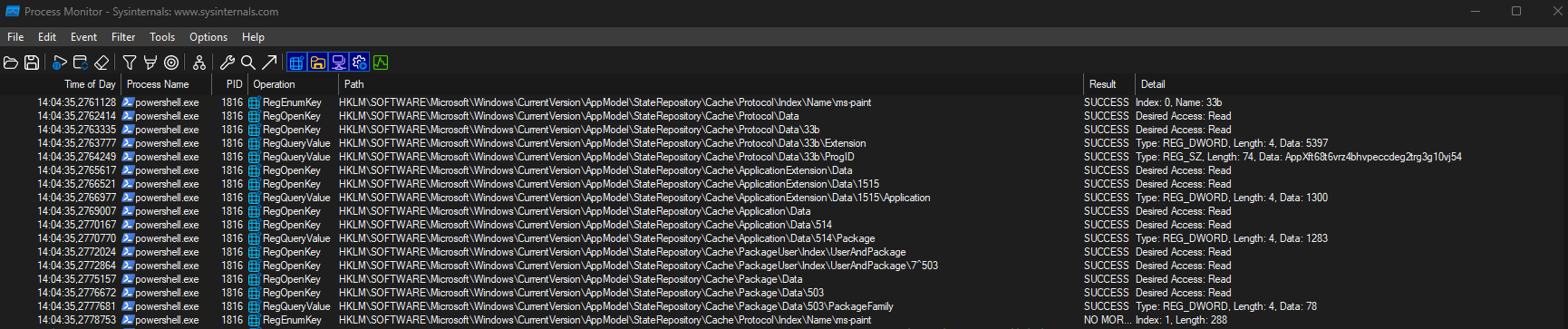
The missing piece is that the delegate is registered under the ProgID, not directly under HKCR\ms-paint. Here are the entries found on the test machine :
HKLM\SOFTWARE\Microsoft\Windows\CurrentVersion\AppModel\StateRepository\Cache\Protocol\Data\33b
    Name   = ms-paint
    ProgID = AppXft68t6vrz4bhvpeccdeg2trg3g10vj54

HKCR\AppXft68t6vrz4bhvpeccdeg2trg3g10vj54\Shell\open
    AppUserModelID            = Microsoft.Paint_8wekyb3d8bbwe!App
    PackageRelativeExecutable = PaintApp\mspaint.exe
    PackageId                 = Microsoft.Paint_11.2605.81.0_x64__8wekyb3d8bbwe
    ContractId                = Windows.Protocol
    command
        DelegateExecute = {A56A841F-E974-45C1-8001-7E3F8A085917}
That CLSID is registered as Packaged CWA Protocol Association Execute Command, also implemented by windows.system.launcher.dll. We are back to DelegateExecute, with the package and application identified by the surrounding metadata. The manifest is how Paint declares its protocol; StateRepository participates in its resolution; DelegateExecute is how this association delegates invocation.
At this point, we know which association is selected and what it points to: a command, a COM implementation, and, when the COM object is a packaged-app launcher, the application behind it. We still need to understand how that application receives the URI.
If you want to inventory protocol registrations and recover their declared package and executable, I put together a small tool: URInspector.
How the URI is passed to the app
With command line substitution, a placeholder like %1 carries the URI in the registered command. In a test with a temporary handler, calling ShellExecuteW with scheme:hello%20world?x=1#part delivered that URI as one argument, with %20 preserved. This describes the Shell test; a caller such as a browser may process the URI before passing it on.
With DelegateExecute, the Shell first invokes a COM handler. For an IExecuteCommand implementation, it supplies the target items through IObjectWithSelection::SetSelection, then invokes the command (cf this Microsoft doc). What happens next depends on the handler. A packaged-app launcher can start or activate another application, so we have to follow the URI beyond the COM object.
Paint and Settings both use DelegateExecute, but their launched processes show two different cases :
- The URI appears on the command line as an argument.
- The app starts as an activation server, and the URI is delivered separately through the platform’s activation infrastructure.
The presence of DelegateExecute alone doesn’t tell us which behavior the target application will have. The effective manifest configuration matters: EntryPoint, but also uap10:RuntimeBehavior and uap10:TrustLevel. Activation attributes can be declared on an extension; otherwise they are inherited from its parent Application (cf Application, combinations of activation info attributes).
For the two packaged apps launched during the test :
| Example | Association found | Application EntryPoint | Launch observation |
|---|---|---|---|
ms-settings | DelegateExecute under the scheme | AppObject.EntryPoint | Server command line, no URI |
ms-paint | Packaged registration, DelegateExecute under its ProgID | Windows.FullTrustApplication | URI on the command line |
Windows.FullTrustApplication identifies a packaged desktop app, equivalent to RuntimeBehavior="packagedClassicApp" with TrustLevel="mediumIL". It doesn’t mean that every app with this value exposes its activation data in exactly the same way. For example, Paint declares it like this :
<Application Id="App" Executable="PaintApp\mspaint.exe" EntryPoint="Windows.FullTrustApplication" uap11:CurrentDirectoryPath="$(env:USERPROFILE)">
And we can see the URI arrive as an argument : mspaint.exe ms-paint:test.

Settings declares AppObject.EntryPoint and starts as an activation server in our test. This manifest entry point describes an activatable class; it shouldn’t be confused with the executable’s native startup function. In Process Monitor, the launched command line carries no URI :

Launching ms-settings:about reproduced this command line :
"C:\Windows\ImmersiveControlPanel\SystemSettings.exe" -ServerName:microsoft.windows.immersivecontrolpanel
Microsoft documents the protocol activation channel through IApplicationActivationManager::ActivateForProtocol: it takes an AUMID and a Shell item, converts the item into a Uri, and delivers it through ProtocolActivatedEventArgs. That explains how an app can receive a URI without it appearing in its launch arguments. The command line observation alone doesn’t identify the exact callback used internally by Settings.
One last distinction: the initial transport and the API used by the app to retrieve activation data aren’t the same thing. Desktop apps using the Windows App SDK lifecycle APIs can retrieve structured activation arguments with AppInstance.GetActivatedEventArgs. An app may also forward an activation to an existing instance. Seeing the URI in a newly launched process doesn’t tell us how that existing instance eventually receives it.
Attack surface
Normally, at this point, you understand a little bit more how custom protocols work. It was important to dive a little bit into how protocols are handled and how to find the handler, because for vulnerability research, you will need to know what these protocols handle and how, also for most schemes, you will not have any documentation on the protocol and the custom arguments it can handle, you will have to reverse the application, find the parser and find by yourself what can be done from that.
We will see different uses that can result from this concept.
Argument and command injection
This technique is directly linked to the Command line handler type. If the registry contains the %1 placeholder, it will be replaced by the whole URI that called the protocol. Depending on how the URI is crafted, it can contain a space or another character that allows injecting arguments, for example with the URI myapp://test --debug, if the registration is the following:
(Default) = "C:\Program Files\Alert\alert.exe" %1
then the program will be launched with the following command:
C:\Program Files\Alert\alert.exe myapp://test --debug
There are several variants and bypasses. For example, quoting "%1" is one way to do it, but by injecting a quote you can break out of the quoting. The most common solutions are the use of -- (POSIX convention meaning that everything after it is no longer treated as an option, so an injected flag is taken as plain data), or Chromium --single-argument, which makes its parser interpret everything that follows as a single argument, regardless of spaces. On top of that, most common browsers encode the URI they pass to the handler and for example turn spaces into %20, limiting trivial injection, unless the application itself decodes the URI before processing it, which can revive the injection primitive or by finding a bypass of the encoder.
An example of a CVE based on this primitive: https://blog.doyensec.com/2018/05/24/electron-win-protocol-handler-bug-bypass.html
Unsafe URI handling
For this technique, we no longer target which command or arguments the application is launched with, but how it handles what we passed to it. A single scheme can expose several routes (through its host, path or parameters), and each one is an attack surface. We can distinguish two behaviors:
- An endpoint exposing a dangerous but intended feature: for example a powerful action by design which can lead to code execution.
- An unintended vulnerability on an endpoint: for example leading to coercion.
For example, you have the following CVE CVE-2026-33829 that led me to explore this topic.
Handler registration abuse
This one attacks the routing itself. As with DLL search order, for protocols the per-user registration (HKCU) overrides the machine one (HKLM), with no admin rights. So anyone who can write to the user’s registry can decide what a scheme runs. Two options:
- Hijack an existing scheme: register the same name in
HKCUor overwrite it and silently intercept every invocation. - Register a new scheme: point a fresh (or unclaimed) scheme at a payload, which can be used as a persistence mechanism, for example.
This primitive can also be used for another goal, like a UAC bypass (the eventvwr / fodhelper techniques): a fileless UAC bypass by hijacking an auto-elevated resolver’s scheme. See enigma0x3’s cf : eventvwr / registry hijack.
Conclusion
Custom URI schemes are just a prefix and a colon, but behind that simple idea there is a whole resolution chain on Windows. To know what really handles a scheme, you have to find where the association lives (the registry, or a packaged app manifest), figure out how Windows resolves it (a plain command line, or a COM object through DelegateExecute), and then follow how the URI is actually delivered to the app (on the command line, or through the activation infrastructure).
A few things are worth keeping in mind:
- A command string and a
DelegateExecutecan coexist on the same association, so finding one doesn’t mean you have the whole picture. - The resolution goes through the merged
HKCRview, where the per-user registration (HKCU) shadows the machine one (HKLM) with no admin rights. - How the URI reaches the app is not a single behavior: it depends on the handler, and on the caller that triggered it.
Once you have all of this in mind, the attack surface opens up on its own: injecting arguments on the command line, abusing what the app does with the URI, or taking over the routing itself.
Resources
- RFC 3986 URI generic syntax
- Registering an application to a URL protocol
- Handle URI activation (packaged apps)
- AssocQueryStringW
- IExecuteCommand
- IApplicationActivationManager::ActivateForProtocol
- Windows App SDK rich activation
- Doyensec Electron protocol handler bug (CVE-2018-1000006)
- blackarrowsec CVE-2026-33829 writeup
- enigma0x3 eventvwr / registry hijack (UAC bypass)